Butterfly主题侧边栏欢迎卡片及个性定位信息教程

Butterfly主题侧边栏欢迎卡片及个性定位信息教程
刘晨翔Demo
2025/10/7 已完成博客迁移工作,不再保留来访者定位卡片。 2025/11/28这里有比我更好的教程 ## 注册使用腾讯位置服务 ### 新建应用 在腾讯位置服务注册账号,根据引导新建应用,选择WebservicAPI获取应用密钥KEY。 - 应用名称和应用类型无要求 - 白名单: - eternlty.top(即你的域名) - localhost(本地预览用) - KEY的格式为:XXXXX-XXXXX-XXXXX-XXXXX-XXXXX-XXXXX
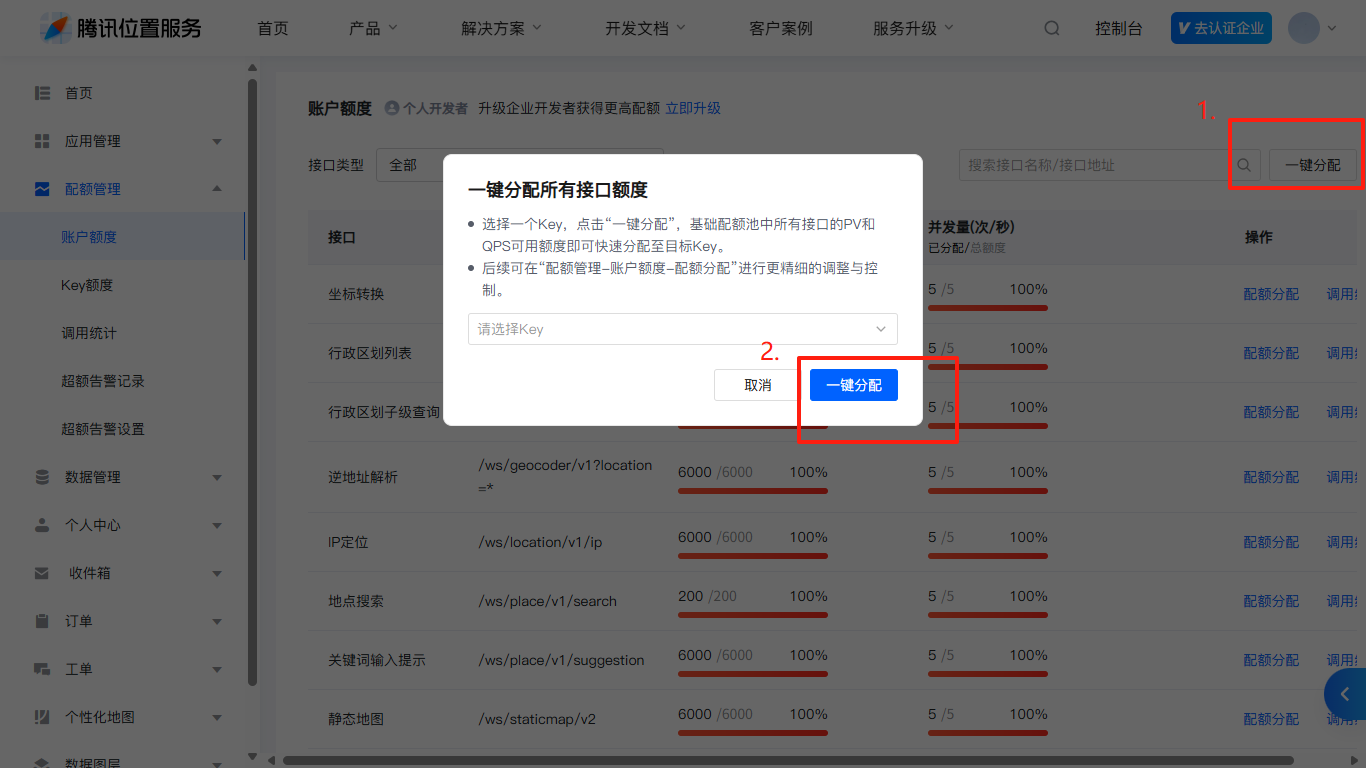
分配KEY
在腾讯位置服务控制台的账户额度中,分配额度。 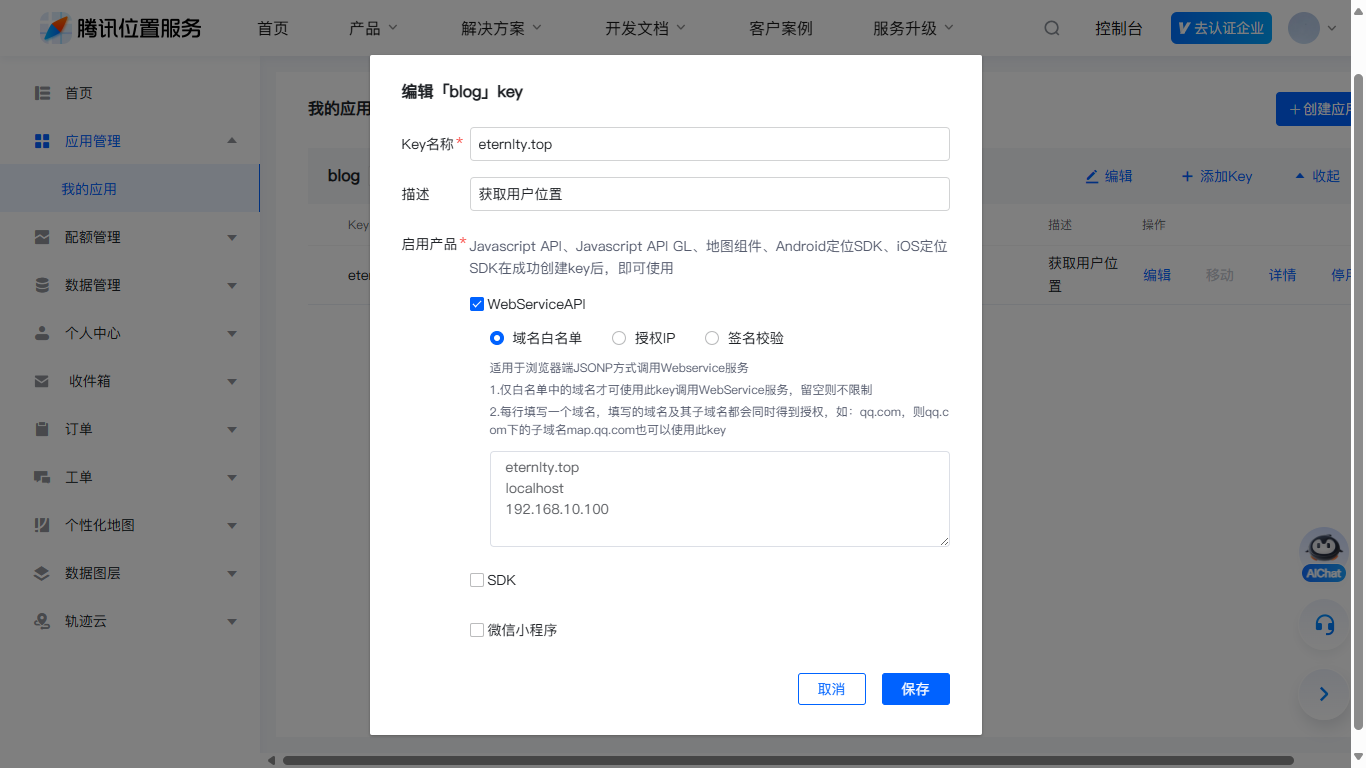
创建访客卡片pug文件
在 [Blogroot]\source\themes\butterfly\layout\includes\widget\ 目录下新建 card_visitor.pug 文件,添加内容: - 查询经纬度
.card-widget#card-visitor
  .item-headline
    i.fas.fa-user //标题
    span 来访者
  .item-content
    #welcome-info
    script.
      var longitude = "XXX.XXXXX"; //你的位置-经纬度-东经
      var Latitude = "XX.XXXXX"; //你的位置-经纬度-西经
      var txkey = "XXXXX-XXXXX-XXXXX-XXXXX-XXXXX-XXXXX"; // 你的api密钥
      var ipLoacation;

      function initWelcome() {
        if (typeof welcometxmap === 'function') welcometxmap();
      }

      if (typeof welcometxmap === 'function') welcometxmap();

      window.addEventListener('load', initWelcome);
      document.addEventListener("pjax:complete", initWelcome);

      // 加载JS文件,文件可下载下来编辑替换为自己的(已压缩,注意格式化)
      if (typeof welcometxmap === 'undefined') {
        var script = document.createElement('script');
        script.src = 'https://npm.onmicrosoft.cn/eternlty-blog-pictures@1.2.4/js/txmap.js';
        script.onload = function() {
          if (typeof welcometxmap === 'function') welcometxmap();
        };
        document.head.appendChild(script);
      }
添加CSS样式
在你的自定义样式[Blogroot]\source\css\eternity.css 文件,没有则新建,添加:
/* 欢迎信息 */
#welcome-info {
  overflow: hidden;
  --icat-card-welcome: #49b1f5;
}
#welcome-info .welcome-time {
  width: 100%;
  margin: 12px 0 0;
  display: inline-flex;
}
#welcome-info .welcome-message {
  width: 100%;
  margin-bottom: 8px;
  display: inline-flex;
}
#welcome-info .welcome-region {
  background: var(--icat-background);
  border: var(--style-border);
  color: var(--icat-fontcolor);
  border-radius: 8px;
  display: inline-flex;
  align-items: center;
  padding: 6px 10px;
  margin: 6px 0;
}

/* 欢迎信息栏样式 */

/*/* IP地址模糊效果 */
.ip-address {
  filter: blur(2px);
  cursor: default;
  transition: filter 0.5s ease;
  color: #49b1f5;
}

.ip-address:hover {
  filter: none;
}
/* 移动端隐藏来访者定位卡片(可选) */
@media screen and (max-width: 768px) {
  #card-visitor {
    display: none;
  }
}
若没有生效,请检查是否在主题配置文件 _config.butterfly.yml中添加自定义 CSS 文件的引用,示例如下:
inject:
  head:
    - <link rel="stylesheet" href="/css/eternity.css">
    # - <link rel="stylesheet" href="/xxx.css">
修改主题配置
在 [Blogroot]\source\themes\butterfly\layout\includes\widget\index.pug 文件添加:
- 去除加号
+即为正常缩进 - 可自行选择要显示欢迎卡片的地方
#aside-content.aside-content
  //- post
  if globalPageType === 'post'
    - const tocStyle = page.toc_style_simple
    - const tocStyleVal = tocStyle === true || tocStyle === false ? tocStyle : theme.toc.style_simple
    if showToc && tocStyleVal
      .sticky_layout
        include ./card_post_toc.pug
    else
      !=partial('includes/widget/card_author', {}, {cache: true})
      !=partial('includes/widget/card_announcement', {}, {cache: true})
      !=partial('includes/widget/card_top_self', {}, {cache: true})
// 仅在文章页显示
+      !=partial('includes/widget/card_visitor', {}, {cache: true})
      .sticky_layout
        if showToc
          include ./card_post_toc.pug
        if page.series
          include ./card_post_series.pug
        !=partial('includes/widget/card_recent_post', {}, {cache: true})
        !=partial('includes/widget/card_ad', {}, {cache: true})
  else
    //- page
    !=partial('includes/widget/card_author', {}, {cache: true})
    !=partial('includes/widget/card_announcement', {}, {cache: true})
    !=partial('includes/widget/card_top_self', {}, {cache: true})
// 仅在page页显示
+    !=partial('includes/widget/card_visitor', {}, {cache: true})
+    !=partial('includes/widget/card_visitor', {}, {cache: true})

    .sticky_layout
      if showToc
        include ./card_post_toc.pug
      !=partial('includes/widget/card_recent_post', {}, {cache: true})
      !=partial('includes/widget/card_ad', {}, {cache: true})
      !=partial('includes/widget/card_newest_comment', {}, {cache: true})
      !=partial('includes/widget/card_categories', {}, {cache: true})
      !=partial('includes/widget/card_tags', {}, {cache: true})
      !=partial('includes/widget/card_archives', {}, {cache: true})
      !=partial('includes/widget/card_webinfo', {}, {cache: true})
      !=partial('includes/widget/card_bottom_self', {}, {cache: true})
结语
最后hexo clean +hexo s带走预览即可
本文根据该教程改良而来,直接集成到主题,原文链接如下

评论
匿名评论隐私政策
✅ 你无需删除空行,直接评论以获取最佳展示效果